Send Upselling Messages Via SMS/WhatsApp
Overview
UpsellGuru can send mobile messages via WhatsApp and SMS, in addition to standard email communication.
- Have an existing account with Asksuite, or
- Be set up with a Twilio account (managed with support from UpsellGuru)
How It Works
With WhatsApp Upselling enabled:
Guests receive a WhatsApp message before arrival
The message includes a secure link to your upsell page
Guests can select room upgrades or extras in just a few taps
If a guest does not have WhatsApp, the message is automatically sent via SMS as a fallback, ensuring delivery.
Why Use WhatsApp for Upselling?
WhatsApp helps you connect with guests who may not engage with email.
Key advantages include:
Higher visibility compared to email
Faster guest interaction
Ability to reach guests without email addresses
Improved conversion and revenue opportunities
This creates a more direct and modern communication channel, increasing the likelihood that guests will engage with your offers.
Guest Experience
From the guest’s perspective, the process is simple:
Receive a WhatsApp message before arrival
Click the link provided
Browse and select available upgrades or extras
Confirm their selection
The experience is seamless and mirrors the standard UpsellGuru flow.
Setup Requirements
To enable WhatsApp Upselling, you will need:
A Meta (Facebook) Business Account
A dedicated WhatsApp Business number (configured via UpsellGuru)
Once this is in place, our team will guide you through a simple setup process, including message template configuration and activation. Setting up an hotel for Whatsapp will require three steps:
- Setting up hotel Meta Account for Business (responsibility: hotel)
- Setting up subaccount on Twilio (responsibility: USG Engineering)
- Setting up the hotel on USG (responsibility: USG & hotel)
*Setting up an hotel for SMS will only require the subaccount on Twillio.*
Hotel Setup on USG
After the hotel and USG Engineering have both completed their setup part, and Meta has approved the template, the final part of the setup will happen on USG Extranet.
From Emails, define delivery strategy:
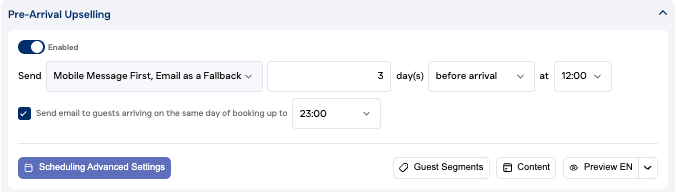
SMS
From Content, select the template stored in Twilio that was already approved by Meta:
Important Notes
WhatsApp is used as the primary channel, with SMS as backup
Messages are delivered through a secure and compliant system
A dedicated phone number is required for this integration
Setup may take a few days due to verification and approval steps
Frequently Asked Questions:
Q: Are WhatsApp messages text-only?
A: Yes, with limited formatting such as bold and italic. Images can also be included in some messages. Q: Can we use an existing WhatsApp number that’s already connected to another provider? A: No, each provider requires a dedicated WhatsApp number. Messages sent via UpsellGuru will not be visible in other systems. Q: Can we use a local phone number? A: Yes, local numbers are usually available via Twilio for an additional fee, depending on the country. In some markets, alternative setup options may be required and can involve extra steps or costs. Q. What if my guest replies to the message? A. You will be able to reply to the message directly from the UpsellGuru extranet. Q. What if the guest has no WhatsApp? A. The message will then be delivered via SMS. Q. Can guests opt-out from WhatsApp or SMS messages? A. Yes, we will automatically handle opt-out keywords.
In Summary
WhatsApp Upselling in UpsellGuru enables you to:
Reach more guests through a preferred communication channel
Increase engagement and upsell conversions
Deliver a seamless, mobile-first guest experience
If you’re interested in enabling this feature, our team is happy to support you through the setup process so send us an email through support@upsellguru.com.